Direction constraint
A direction constraint is a constraint on the orientation of the robot’s TCP.
It consists of two vectors: One in the world coordinate frame and one in the TCP coordinate frame.
The constraint specifies that the TCP vector should be aligned with the world vector.
Two real-world examples of a direction constraint are
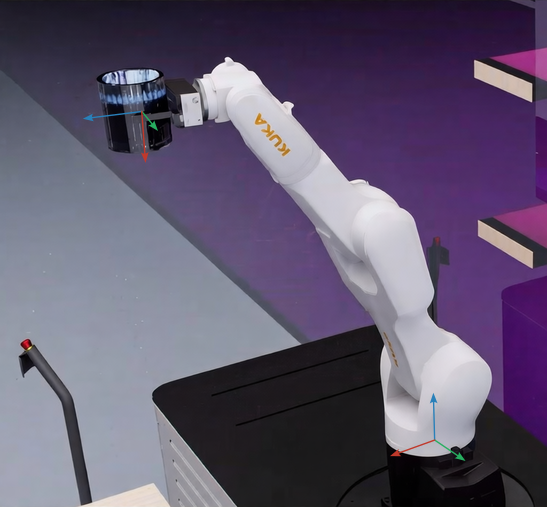
- Moving a cup with liquid without spilling it. You want to keep the cup upright, which means that the vertical of the cup should always point upwards in the world frame.
- Moving objects with a vacuum gripper, e.g., for palletizing. Your TCP should always face downwards, which means that the z-axis of the TCP should always point downwards in the world frame.
To achieve this, you can use the direction constraint in the robot’s motion planning.
Currently, Wandelbots NOVA supports direction constraints for industrial robots (ortho-parallel with spherical wrist) and UR robots.
Two axes define the constraint
A direction constraint consists of two axes definitions: One for the world coordinate frame and on for the TCP coordinate frame. Those two axes specify which rotations are constrained and which are free.
Cup
In the cup example, you want to keep the vertical axis of the cup aligned with the z-axis of the world. Rotations around those axes are allowed, as they do not spill the content of the cup.
The TCP constraint depends on how you defined your claw grippers coordinate frame. In the example depicted in the image you want the negative x-axis of the gripper aligned with the z-axis of the world:
"constraint": {
  "tcp": [-1, 0, 0],
  "world": [0, 0, 1]
}
Calculate the constraint
If the definition of the TCP constraint axis is not obvious to you, you can follow these steps:
- Move the robot into a position where the constraint is satisfied, e.g., by jogging the robot in Robot Pad.
- Use Forward kinematics to obtain the rotation of the TCP in the world frame,
R_world_tcp. - With its inverse you can transform the world frame constraint into the TCP frame constraint:
constraint_tcp = R_tcp_world * constraint_world.
Find a valid start position
All direction constrained motions require start_joint_position to satisfy the constraint as a safety measure.
To move the robot into the closest valid position you can project your robots current position either in joint space or cartesian space:
- To perform the projection in joint space use Project joint position to direction constraint .
Depending on your robots kinematic structure this may only alter the wrist joints of it. - To project the cartesian pose of the TCP use the python snippet below.
This will only alter the orientation but not the position of the TCP.
import numpy as np
from scipy.spatial.transform import Rotation as R

def project_cartesian_pose_direction_constraint(T_world_tcp: models.Pose, constraint: models.DirectionConstraint) -> models.Pose:
  constraint_tcp = np.array(constraint.tcp)
  target_constraint_world = np.array(constraint.world)
  R_world_tcp = R.from_rotvec(T_world_tcp.orientation.root)
  current_constraint_world = R_world_tcp.apply(constraint_tcp)
  R_corr, _ = R.align_vectors([target_constraint_world], [current_constraint_world])
  R_world_tcp_new = R_corr * R_world_tcp
return models.Pose(position=T_world_tcp.position, orientation=R_world_tcp_new.as_rotvec())- Move into this obtained closest valid position via a
JointPTPorCartesianPTPpath.
Plan with constraints
Either plan a trajectory with motion_commands of type DirectionConstrainedCartesianPTP or DirectionConstrainedJointPTP
or search for a collision free path with the constraint argument.
Only RRTConnect is currently supported as collision-free search algorithm for direction constrained motions.